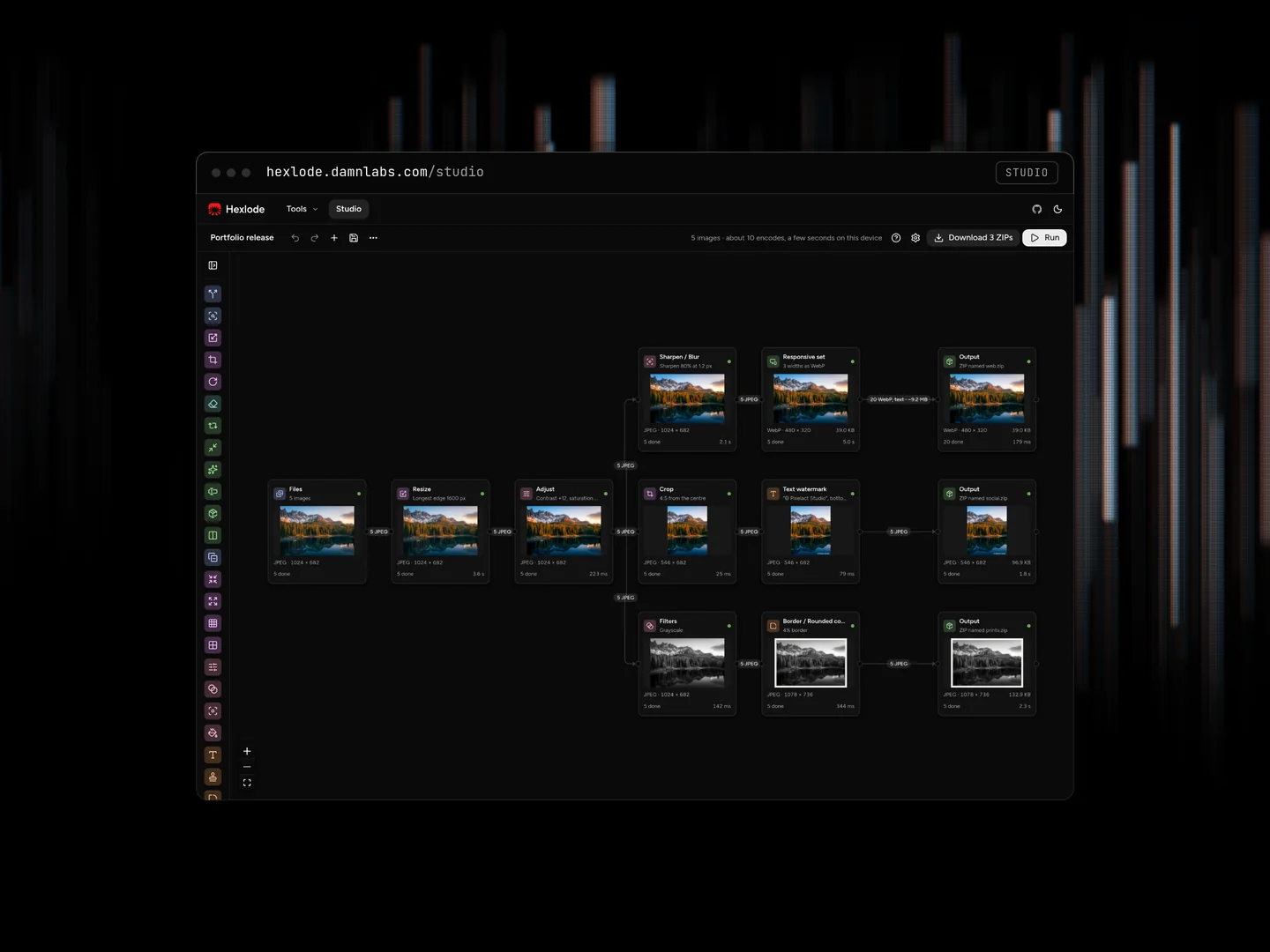
Hexlode: open source batch image processing in the browser
Hexlode is an open source web app that converts, compresses, resizes, crops, rotates, and strips metadata from images on your own device, one file at a time or hundreds through a pipeline. Pixelact Studio built it under its Damn Labs branch and publishes the source under the Apache 2.0 license.
An open source web app that converts, compresses, and resizes batches of images on the user's device, with a node-based Studio for reusable pipelines.
Hexlode at a glance
Type
Open source web app for converting, compressing, and resizing images in batches
Built by
Damn Labs, the experimental and R&D branch of Pixelact Studio
License
Apache License 2.0. The jSquash codecs keep their own permissive licenses.
Status
Live at hexlode.damnlabs.com. Version 0.2.0, released October 2026, ships 13 of 33 planned node types
Platform
Runs in the browser over HTTPS. Quick tools work on phones, and the Studio needs a desktop screen.
Stack summary
TypeScript, React, TanStack Start, React Flow, jSquash WebAssembly codecs, Web Workers, and OPFS
Privacy model
Images are processed on the device. Analytics are cookieless and never include file names, pixels, or metadata.
Decisions
The decisions behind Hexlode
The technical calls that shaped how it works: what we picked, and the trade-off that made it the right pick.
Decision 01
One engine for quick tools and the Studio
What we chose
Every quick tool is a fixed pipeline that runs on the Studio's engine, even though a Convert page could call an encoder directly.
Why
Each node is tested once, a quick tool and the same steps in the Studio produce identical files, and a saved pipeline becomes its own tool page with no extra code.
Decision 02
WebAssembly codecs instead of browser encoders
What we chose
Encode and decode with the jSquash builds of MozJPEG, libwebp, libavif, libjxl, oxipng, and QOI, not with OffscreenCanvas.convertToBlob.
Why
The browser encoders offer one quality setting, cannot write AVIF or JPEG XL, produce different bytes in each browser, and Safari cannot write WebP. Each codec downloads on first use, so a page loads only what it needs. GPL-licensed libimagequant is left out to keep the license permissive.
Decision 03
Disk-backed outputs and step cache
What we chose
Output nodes and the step cache write to the Origin Private File System, not to memory or IndexedDB.
Why
Memory use stays flat as the batch grows, workers write through synchronous access handles, and the ZIP streams from disk. The step cache has a 5 GB default budget and drops the least recently used results, because caching every node for a large batch can need tens of gigabytes.
Decision 04
Cookieless analytics with masked autocapture
What we chose
PostHog runs with cookieless_mode: 'always', no person profiles, masked element text and attributes, and session replay off.
Why
File names appear on screen, so unmasked click capture would send them. This setup stores nothing in the browser, which is why the app has no consent banner, and it still shows where people click and get stuck. Named product events carry counts, node types, and timings, never file names or pixels.
Hexlode is an open source image processing app with two levels, both running in a browser tab. Six quick tools each do one job on a simple page: Convert, Compress, Resize, Crop, Rotate, and Strip metadata. The Studio is a desktop node editor where you connect steps such as Resize, Convert, and Rename into a branching pipeline, run a batch through it, and save it for next time.
A saved pipeline can also open as its own quick tool page, without the canvas. You build the pipeline once in the Studio, then drop new images into that simple page whenever you need the same result.
Hexlode is built for people who repeat the same image work on large batches: web developers preparing assets, designers exporting variants, shop owners resizing product photos, and photographers removing location data before sharing. It reads and writes JPEG, PNG, WebP, AVIF, JPEG XL, and QOI.
Hexlode handles repeated image work without sending the images to a server. Many online converters upload each file to process it, a poor fit for client photos, unreleased product shots, or pictures carrying GPS coordinates.
The browser's built-in encoders give one quality setting, cannot write AVIF or JPEG XL, and produce different bytes in each browser. Command-line tools such as ImageMagick handle batches well, but someone has to write and maintain the scripts. Hexlode puts a repeatable, visual batch pipeline in a browser tab.
Hexlode processes images in Web Workers on the user's device, with WebAssembly codecs and the browser's Origin Private File System for storage. The engine is plain TypeScript with no React inside it, and the interface subscribes to its events. A run has five stages.
01Plan the flowThe engine reads the pipeline, a directed graph without cycles, and checks what each node accepts. Files no branch can use are refused before the run, with the reason.
02Spread images over workersA pool of Web Workers runs the batch, one image per worker. The pool gets one worker per CPU core minus one, and fewer when device memory cannot hold that many copies of the largest decoded image.
03Decode once, encode lateEach image travels the whole pipeline inside one worker, so pixels never cross threads. It is decoded the first time a node needs pixels and encoded at Convert, Compress to size, or Optimize PNG. An image that reaches Output without one of those keeps its source format, and its original bytes if no node changed its pixels.
04Cache every stepEach node keeps its last results in a step cache. Change one setting and run again, and only that node and the nodes after it do any work.
05Deliver from diskOutput nodes write finished files to the Origin Private File System, then stream a ZIP from it or save into a folder where the browser allows that. Temporary run files are deleted after delivery.
Data
Where it goes
Image bytes, file names, and thumbnails
Stay on the device. Analytics never include them, and error reports have file names removed.
Run files
The Origin Private File System on the device, deleted after delivery, when a new run starts, and on the next visit.
Step cache
The Origin Private File System, kept between visits up to a size limit. Studio settings change the limit or clear the cache.
Drafts
Session storage for each tab, plus the last unsaved draft in local storage for one day. Nodes, settings, and the name, never images.
Saved pipelines
Browser storage, only after the user clicks Save. A pipeline can also be exported as a versioned .hexlode file.
Product analytics
PostHog in cookieless mode: tools used, pipeline shapes, counts, timings, and error codes.
Error reports
Sentry, with file names removed from messages, exceptions, and logs before sending.
What the hosted version of Hexlode stores and sends
Yes. Hexlode's full source is on GitHub under the Apache 2.0 license, and the hosted app at hexlode.damnlabs.com is free and needs no account. A fresh clone runs without an environment file, and it sends nothing to PostHog or Sentry unless its environment sets their keys.
Run Hexlode locally with Node.js 24 and pnpm 11, then open localhost:3000.bash
git clone https://github.com/pixelactstudio/hexlode.git
cd hexlode
pnpm install
pnpm dev
To self-host it, use the Docker image CI publishes to GitHub Container Registry for x86 and ARM. docker run -p 3000:3000 ghcr.io/pixelactstudio/hexlode:latest starts the same release that serves the live site. Browsers turn on the Origin Private File System only over HTTPS or at localhost, so a copy on another host needs HTTPS in front of it.
Five problems took the most design work: memory on large batches, metadata, branches that accept different formats, tabs that share storage, and tests that need a real browser.
Large batches in one tab. A decoded 12-megapixel image takes about 48 MB, so the pool admits only as many images as it has workers and writes finished files to disk. A scale test runs 500 such images through a template and checks that memory does not grow with the batch.
Metadata without re-encoding. Strip metadata rewrites the container for JPEG, PNG, WebP, and JPEG XL instead of re-encoding pixels, and keeps the orientation tag so photos stay upright. When a format cannot keep metadata, the run reports a warning.
Branches that accept different formats. A strict rule would break the most natural pipeline: one branch for JPEG and one for PNG after the same Files node. An item that a node cannot accept skips that branch, the connection is labeled PNG only, and skipped items are counted apart from failed ones.
Several tabs sharing one disk. Each tab holds a Web Lock on its latest run, and cleanup skips locked runs, so one tab never deletes files another tab is still reading.
Testing what only browsers do. Worker, OPFS, codec, and ZIP tests run in real Chromium, Firefox, and WebKit through Vitest browser mode, with WebKit skipping the OPFS suites its Playwright build cannot run. A node pair matrix checks that each connection the Studio allows or refuses matches what the engine does.
What does Hexlode show about how Pixelact builds software?
Hexlode is an open source tool, not client work. Its public repository shows the engineering habits Pixelact uses on every build, including product development for funded startups.
Decisions are written down. Ten architecture decision records explain the major choices, and a CONTEXT.md glossary fixes terms such as skipped and failed. Our guide to architecture decision records explains why that helps the next engineer.
Privacy is part of the design. Every analytics event is checked against a schema, events never carry file names, paths, pixels, or typed text, and the privacy page lists each one.
Releases are routine. Every pull request runs Biome, type checks, unit tests on three operating systems, browser tests in three engines, CodeQL, and a container smoke test. Release Please tags versions, each merge deploys staging, and each release deploys production. Our guide to safe releases and rollbacks covers the rest of a release process.
Scope is staged. Version 0.2.0 ships 13 of the 33 planned node types, and two later phases add the other 20. The database and account code for a possible cloud mode keeps compiling but stays unused, so a fresh clone needs no database.
The same engineers design and build products, internal tools, and AI systems for funded startups. Tell us what you need, or book a call to talk it through.